
X Delegate not working? Invites, mobile and limits (2026)
X’s help page gives Delegate one paragraph of troubleshooting. This page starts from what you see on screen and says which of the limits and Premium claims you’ve read have a source.


When X Delegate is not working, check four things first: whether the person you are inviting allows Delegate invites, whether they accepted the invite, whether someone is trying to switch accounts inside the X mobile app, and whether your role can manage members.
This is the troubleshooting companion to our guide on how to give someone access to your X account, which has the setup steps and screenshots. Below, each symptom comes with its cause and fix. Every source was checked on 1 October 2026.
| Symptom | Likely cause | What to do |
|---|---|---|
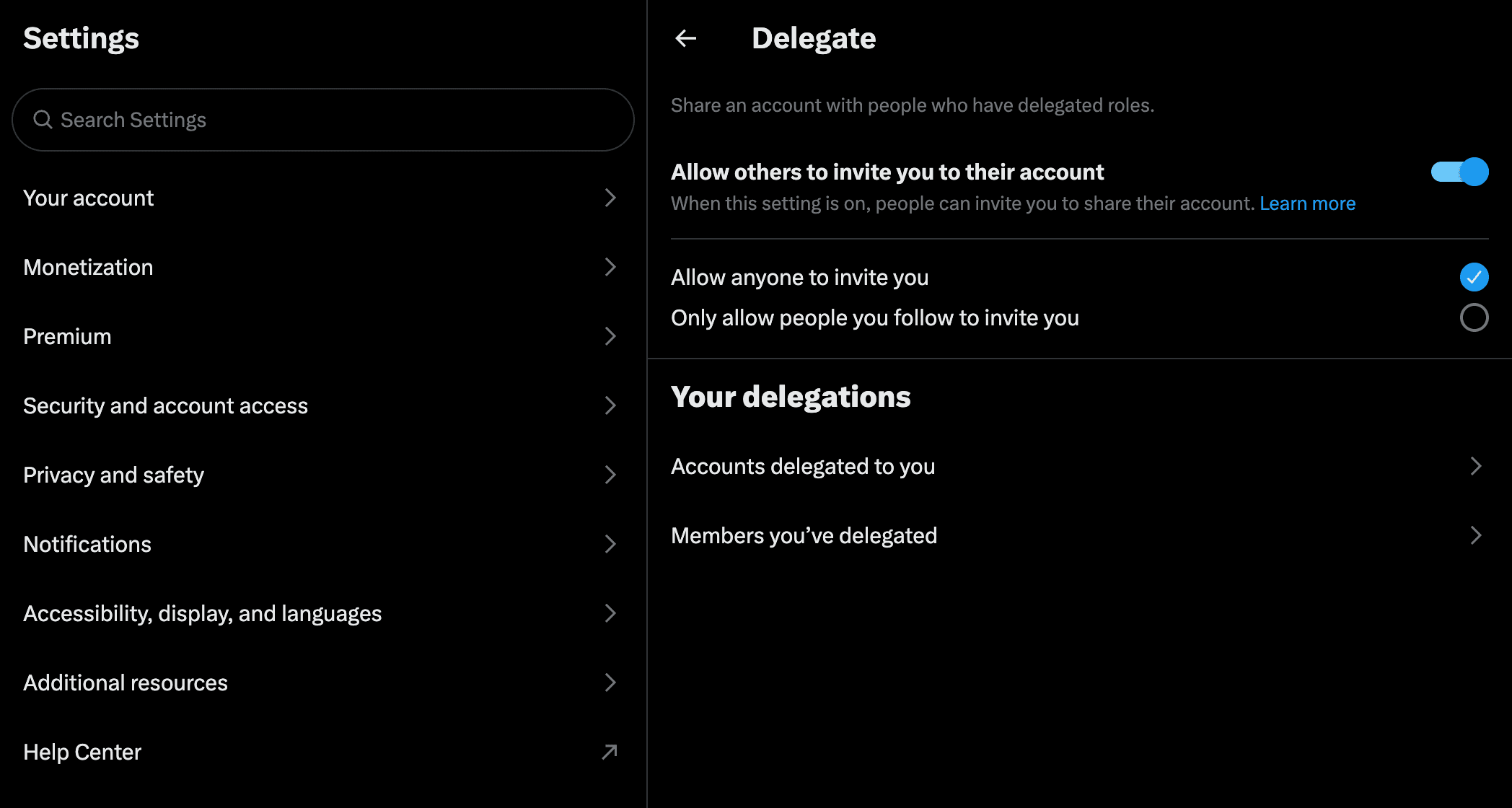
| The person is not in the invite search | Their “Allow others to invite you” switch is off, or limited to people they follow | They turn it on and select “Allow anyone to invite you” |
| “This member doesn’t allow Delegate invites.” | Their “Allow others to invite you” switch is off (a June 2024 Reddit post) | They switch it on and select “Allow anyone to invite you” |
| No way to switch accounts in the phone app | Users report no switch in the X app; X documents x.com and X Pro only | Use x.com on a desktop |
| Invite sent, nothing changed | The invite has not been accepted | They accept it under Pending invites |
| No invite email arrived | It comes from info@x.com, most likely to the email on their X account, which may be a shared inbox | Search that inbox for “Twitter Delegate”, or accept on the Delegate screen |
| “Something went wrong. Please try again.” | Unexplained by X; one user had it for months in 2024 | Private window, updated browser, add-ons off |
| No “Invite a member” button | Contributors cannot manage members | Ask the owner or an Admin |
| A post went out from the wrong account | “Acting as” applies to every X tab in that browser | Check the sidebar account button before posting |
| A delegate kept access after a password change | Delegates “won’t lose access” when the password changes | Remove them in Members you’ve delegated |
| A scheduler can’t post as the delegated account | A July 2024 developer-forum reply says the X API doesn’t support delegation | Post from x.com or X Pro |
Why can’t I find the person I’m trying to invite?
Check the person’s own Delegate settings first. While “Allow others to invite you to their account” is switched off there, they cannot be invited. It is the only troubleshooting advice on X’s Delegate help page: “The person may have settings enabled that prevents them from being invited to receive a delegation. Talk to the person to check whether this is the case.”
The switch has a second setting. Leadsie’s guide tells the invitee to turn it on “and check ‘Allow anyone to invite you’”; Local Service Spotlight notes the other choice is “only people they follow”. Leadsie adds that the switch “can be switched off after, and you’ll still get to keep the shared account access.”
How to allow Delegate invites on X
The invitee opens x.com/settings/delegate (More → Settings and privacy → Security and account access → Delegate), turns on “Allow others to invite you to their account” and selects “Allow anyone to invite you”. The same switch is on the Delegate screen in the X app, as a September 2025 YouTube walkthrough lists step by step. The path with screenshots is step 1 of our Delegate setup guide.
“This member doesn’t allow Delegate invites.”
A Reddit post from June 2024 ties this message to that setting. It quotes the message and gives the fix: the person turns the delegate setting on and ticks “Allow anyone to invite you”.
When the switch is on and they still don’t appear
In a 2023 Reddit thread, one commenter said “new accounts and accounts with little activity do not show up in the delegate search”; in February 2024 another found their 2008 account missing while a day-old burner appeared. The June 2024 post points the other way: its author added an account “no more than a few min old” after following it. In July 2024 a user on X’s developer forum wrote that an account “enabled to be invited to delegation” still did not show up in the invite search. None of these threads has an answer from X.
What is left to try comes from that June 2024 post: follow the person from the account you are inviting from, unfollow and follow again “a few times”, then search their @handle again. X’s help page does not mention it, and a November 2024 reply says even “a ton of follow/unfollow cycles” did not help.
Why can’t I switch to a delegated account in the X mobile app?
From 2023 to September 2026, users on iPhone and Android have reported that the X app has no way to switch into a delegated account, although the app does have the Delegate settings screen. X’s Delegate help page names only x.com and X Pro. In the same threads, users say switching works on desktop, and 2023 reports say x.com in a phone browser worked too.
The help page says “Delegate is available on X.com and X Pro, but you need to enable Delegate and invite collaborators on X.com,” and does not mention the iOS or Android apps. Leadsie’s guide gives app steps for inviting, and a September 2025 YouTube walkthrough opens Accounts delegated to you in the app. Neither mentions switching. We have not tested switching in the apps ourselves, so the table lists dated reports.
| Source | What it says |
|---|---|
| X help page | “available on X.com and X Pro”; no mention of the apps |
| @xDaily, July 2023 | Works on mobile web “(may be extended to the mobile apps at a later date)”. A news account. |
| Reddit, September 2023 | “I can’t see the option to switch into the delegated account on Android.” |
| Reddit, October 2023 | “It only works on mobile web and desktop, not the mobile app.” |
| Reddit, February 2024 | “Same situation with IOS X app” |
| Reddit, February 2026 | “on my laptop fine but cant do it on my iPhone” |
| Reddit, 12 September 2026 | “is it still not an option to swap to the delegated account while on mobile?” Unanswered on 1 October. |
Sources: the 2023 Android thread (with the October 2023 and February 2024 replies), the February 2026 iPhone thread, the September 2026 thread and the @xDaily post. The phone-browser workaround rests on those 2023 reports and on a Reddit user who wrote “I believe it works on safari”.
I sent the invite. Why has nothing happened?
An invite gives no access until the other person accepts it. X’s help page tells them where: “Click Accounts delegated to you. Under Pending invites you’ll see the X account that you’ve been invited to join,” then Accept.
X says the invitee gets “an email, and an invitation in Delegate on x.com.” An invite email from September 2026 came from info@x.com with the subject “@[inviter] invited you as a contributor”. Its footer named the invitee’s @handle, so it most likely goes to the email on their X account; for a company that may be a shared inbox. The email still says “Twitter Delegate”, which is the phrase to search for. If it never arrives, the invite is still waiting on the Delegate screen.
What does “Something went wrong. Please try again.” mean?
X has not explained the “Something went wrong” Delegate error in public. The clearest report is a developer forum post from September 2024: the user got “Something went wrong. Please try again.” for “anyone I try to assign as delegate (admin or contributors)”, and it had been happening since February 2024. The topic got no replies and closed automatically in October 2024.
That user had already tried a private browser, logging out, clearing cache and cookies and turning off add-ons, and wrote that seven months had passed since being told “the team will be looking into it”. Run the same steps first; past them, nobody has documented a fix on your side.
Why is there no “Invite a member” button?
Only the owner and Admins can invite. X’s help page: “Both owners and admins can manage delegates on the account,” and “contributors do not have the ability to manage delegated accounts. Only admins can manage the team.” If you are acting as the account with the Contributor role, the owner or an Admin has to send the invite.

One user in September 2023 lost the link at four contributors. On X’s developer forum they wrote that “the ‘add members’ link no longer appears” and asked whether there was a limit. Nobody answered, and no X help page we read gives a limit of four.
Both roles can also read the account’s Direct Messages: X’s role picker says “Contributors can also view the account’s Direct Messages, posts, and Lists,” and Admins have “the same permissions as contributors”. Our Delegate guide covers what that includes and what the X Chat passcode changes.
How do you switch to a delegated account on X, and back?
On x.com, open the account menu at the bottom of the left sidebar and pick the delegated account. X’s help page lists the ability to “Switch between your owned and delegated accounts” without describing the clicks, and at launch in 2023 a news account wrote that “You switch to the delegated account the same way you switch to an alt account.” To switch back, open the same menu and click your own account at the top. X then reloads the page.
In X’s desktop web interface as of September 2026, the sidebar button shows the delegated account while you act as it. Opened in that state, the menu lists your own account at the top, the delegated one below it marked “acting as”, and a “View delegate accounts” item.
The acting-as state covers the whole browser profile, so every X tab in that browser acts as the same account until you switch back. Check the sidebar button before you post, and let the reload finish after switching. A mistake is the owner’s: “Account owners are responsible for the content posted to their accounts by authorized admins and contributors.”
If posting or scheduling as the delegated account fails outright, one writer who manages a client’s account through Delegate says it “doesn’t always work” and advises “Give it an hour or more, and try again, and then it usually works,” which X’s help page does not mention.
How many delegates can an X account have, and how many accounts can one person manage?
X’s Delegate help page gives no number for either. X’s help page on Teams in X Pro, with the same Owner, Admin and Contributor roles, says “You can add up to 200 team members,” but also that “The team management features are only available in X Pro”. It does not say whether 200 applies to Delegate on x.com. We found no X figure for how many accounts one person can be a delegate on; the 5 you may have read comes from agency blogs that give no source.
Every number in circulation, and where it comes from:
| Number | Source | How much to trust it |
|---|---|---|
| 200 team members | X help: “How to use the Teams feature on X Pro” | X’s own figure, written for X Pro |
| 25 members for Premium users | @xDaily post, 18 August 2023 | A news account; no X page we found repeats it |
| 5 accounts per delegate | Ampfluence and Inspire to Thrive blog posts | Stated as a rule, no source |
| 4 contributors | One developer forum post, September 2023 | A user asking whether a limit exists |
Sources: the @xDaily post, Ampfluence and Inspire to Thrive. An AI search summary we ran on 1 October 2026 repeated the 25 and the 5 as if X had published them.
A separate limit applies to the account itself. X’s limits page, checked 1 October 2026, gives “50 original posts and 200 replies per day for unverified accounts” and says the limits “include actions from all devices”. Posts by delegates most likely count toward the same totals, though X does not say so. For pacing, see how many replies a day to post on X.
Do you need X Premium for Delegate?
X’s Delegate help page names no Premium requirement for using Delegate on x.com. X’s About X Premium page does list “add contributors and admins to your account” as part of Access to X Pro, in a block headed “Only for Premium+ Tier”. So the answer has two halves: managing contributors and admins inside X Pro is a Premium+ feature, and for x.com the Delegate help page lists nothing. Both pages were checked on 1 October 2026.
The flat claim “Delegate feature requires X Premium” turned up only as a line printed by a sample script on a tutorial site, with no source.
Does Delegate work in X Pro and third-party tools?
In X Pro, yes, according to X: “Delegate is available on X.com and X Pro,” and the X Pro FAQ says “X Pro lets you delegate access to your team members without the need to share passwords.” Users have reported trouble there too. In January 2026 a Reddit user asked whether delegated accounts were “no longer usable” in X Pro; the only reply, five days later, asked whether they had fixed it.
For third-party tools, the latest answer we found is a July 2024 reply on X’s developer forum: “The X API currently does not support Account Delegation. You can only make posts, DMS, etc. as the authenticating user.” If that still holds, a scheduler connected to the delegate’s own account can only post as that account, not as the one delegated to them.
We work through this same feature: the Contributor role, on your own account, with no password shared.
Book a callWhy don’t the buttons match X’s help page?
X’s help page and X’s settings screens name three controls differently. If the help page’s button is missing, look for the screen’s wording:
| What it does | X’s help page says | The screen says |
|---|---|---|
| Lets others invite you | “Allow others to Delegate to you” | “Allow others to invite you to their account” |
| Lists the people you added | “Members you’ve delegated to” | “Members you’ve delegated” |
| Removes a member | “Remove from account” | “Remove from group” |
A delegate who wants out uses Leave account under Accounts delegated to you. Changing the password removes nobody: “Your delegates won’t lose access to the account if you change the password.”
Frequently asked questions
Why can’t I find someone to add as a delegate on X?
Usually a setting on their side. On their Delegate screen, “Allow others to invite you to their account” must be on, with “Allow anyone to invite you” selected. With it off, a 2024 Reddit post says you may see “This member doesn’t allow Delegate invites.” Some accounts stay hidden even with it on.
Can you use a delegated X account in the mobile app?
Not according to users. From 2023 to September 2026 they have reported that the iOS and Android apps offer no way to switch into a delegated account, although the Delegate settings screen is in the app. X’s help page documents Delegate on x.com and X Pro only. The same users say switching works on desktop.
How many delegates can an X account have?
X’s Delegate help page gives no number (checked 1 October 2026). X’s Teams in X Pro page says up to 200 team members, without saying whether that applies to Delegate on x.com. The 25 members and 5 accounts per delegate come from a 2023 news account and agency blogs, with no X source.
How do I post as a delegated account on X?
Switch into it first. On x.com, open the account menu at the bottom of the left sidebar and pick the delegated account. Everything you post then goes out as that account, in every X tab of that browser, until you switch back from the same menu. Users report the iOS and Android apps have no such switch.
Does changing my password remove a delegate on X?
No. X’s help page says “Your delegates won’t lose access to the account if you change the password.” To remove someone, open Members you’ve delegated in your Delegate settings and choose Remove from group, which X’s help page calls Remove from account. A delegate can also leave on their own with Leave account.
If the delegate you are adding is us
Posts, replies, likes and follows every day, from your own X account and in your voice.
Before we start, you approve examples of your voice and the list of accounts we reply under.
Access is X’s own Delegate feature with the Contributor role. No password changes hands.
You can remove us on the same Delegate screen at any moment.